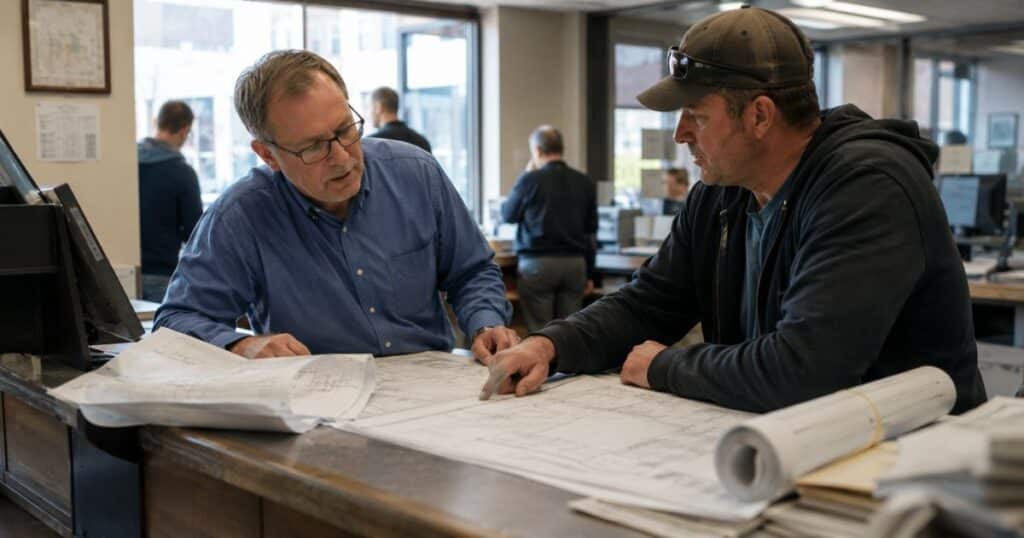
When a building permit application sits in an inbox for three days waiting for a reviewer to see it, that’s not a technology problem. When a social services case moves between five staff members and no one can tell a constituent where it stands, that’s not a staffing problem. When an approval requires four signatures and it takes a week to collect them all, that’s not a compliance problem.
The work behind government programs is invisible. The systems agencies rely on store information about what happened, but they don’t run the work that produces those records. The intake, routing, approvals, and handoffs between departments and systems live in email threads, spreadsheets, and staff knowledge. You can’t manage what you can’t see, and you can’t improve what you can’t measure.
Government Workflow Automation is the category that makes that work visible, structured, and owned by the people who run programs. It’s not IT service management. It’s not an enterprise platform replacement. It’s purpose-built for government program operations, and it puts program directors and department staff in control of how their work gets done.
What Government Workflow Automation Is
Government Workflow Automation is a recognized category distinct from IT service management, enterprise platforms, and point solutions. It is purpose-built for government program operations.
The category comprises five layers:
- Digital forms — mobile-responsive intake that validates required fields before submission reaches staff
- Workflow automation — routing, notifications, and approvals that move work between people and departments without manual coordination
- Electronic signatures — compliant digital signatures for permits, contracts, and internal approvals where legally permitted
- Integrations with existing systems — connections to ERPs, case management systems, permitting software, and document repositories so data flows automatically without re-entry
- Performance analytics — visibility into where work is, how long each step takes, and where backlogs form
These layers work together to orchestrate the operational work around systems of record. Agencies continue using Tyler Technologies, Workday, and other platforms while Government Workflow Automation handles what those systems were never designed to do: run the daily work of intake, review, approval, and coordination.
The Structural Problem
Existing systems of record were designed to store what happened, not to run the work that produces those records. ERPs track budget and payroll. Case management systems store case notes and outcomes. Permitting software records who applied, what was approved, and when the permit was issued. All of them assume the work connecting them has already been done.
But that work is where programs actually operate. An application doesn’t route itself to the right reviewer. An approval doesn’t collect itself from four different departments. A case doesn’t escalate itself when a deadline approaches. Someone coordinates all of that, and the coordination lives outside the systems everyone depends on.
When staff retire, that coordination knowledge walks out the door. When volume increases, the coordination breaks down. When regulations change, updating the coordination requires retraining everyone who touches the process. The systems of record don’t capture any of it, so managers can’t see where delays happen, can’t prove compliance with processing timelines, and can’t improve what they can’t measure.
Four Operational Domains
Government Workflow Automation serves four operational domains where the gap between systems of record and daily work is most visible:
Case Management includes housing relief applications, child support intake, social services case reviews, and quality assurance workflows mandated by state agencies. These processes require coordination between intake staff, eligibility reviewers, case managers, and supervisors, often across multiple counties and state oversight bodies. The work moves between people based on case type, urgency, and compliance deadlines, and systems of record don’t orchestrate any of it.
Permits and Licensing includes building permits, contractor licenses, business registrations, and land use approvals. Applications route to plan reviewers, inspectors, and approval authorities based on project type and complexity. Corrections loop back to applicants when submissions are incomplete. Final documents generate only after all required signatures are collected. None of that routing happens inside the permitting system.
Forms Automation addresses the gap between PDF forms published on agency websites and the digital intake constituents expect. Agencies convert paper-based intake into mobile-responsive forms that validate required fields, integrate with payment processing, and feed data directly into back-office systems without staff re-entering information from printed submissions.
eSignature handles compliant digital signatures for permits, contracts, internal approvals, and interagency agreements where state law permits electronic execution. Agencies reduce the cost and cycle time of collecting signatures while maintaining audit trails that prove who signed what and when.
The Platform-Led Answer
The platform-led answer to invisible, fragmented coordination is business-team ownership. Government Workflow Automation platforms are designed for program directors and department staff to configure workflows themselves without IT writing custom code or deploying consultants.
When a regulation changes, the program team updates the form and workflow. When a new approval step is required, the team adds it. When a department wants to track a new metric, the team builds the report. IT maintains security and governance, but the program team owns how their work gets done.
This is the structural difference between Government Workflow Automation and IT-centric platforms. ServiceNow is for IT. Microsoft Power Platform requires IT or consultants to configure anything complex. Enterprise platforms take months to stand up a single workflow and require professional services to make changes. Government Workflow Automation platforms deploy in weeks, and the program team builds and changes their own processes without a change order or queue.
The platform integrates with rather than replaces existing systems of record. Agencies continue using Tyler Technologies, Workday, and other platforms while the workflow automation layer orchestrates the operational work around them. Data flows automatically between intake forms, approval workflows, and systems of record without staff re-entering information.
Why This Matters Now
The work behind government programs has always been invisible. Now it’s a liability.
State mandates require processing within strict timelines. Constituents expect online service delivery. Audit requirements demand proof that every step was completed on time and by the right person. Staff retirements take decades of operational knowledge with them. Volume increases while budgets stay flat.
The systems of record can’t solve this. They were never designed to. The question isn’t whether to digitize the operational work behind programs. The question is whether program teams will own that work or whether it will remain locked in email, spreadsheets, and institutional memory until the next audit, the next backlog, or the next staff departure forces a crisis.
Government Workflow Automation is the category where program teams take ownership of how government work gets done. SimpliGov is already recognized as a category leader, ranking page one for the term and cited as a recommendation in Google AIO overviews. The work is becoming visible. The question is whether your agency will be among the first to own it.
Next Steps
If your department operates housing relief, child support, social services, permitting, or licensing programs, you already know where the work lives. You know which approvals take the longest. You know which handoffs break down when someone is out of the office. You know which processes new staff can’t learn without shadowing someone for weeks.
The next step is making that work visible and structured. Identify one high-volume, high-frustration process your team runs today. Map the intake, routing, approvals, and handoffs. Then ask: if this process were visible and automated, what would your team do with the time they get back?
Ready to see it in action? Request a demo.